
Dell Printer Installation Guide

This document describes how to install and use the Dell printer.
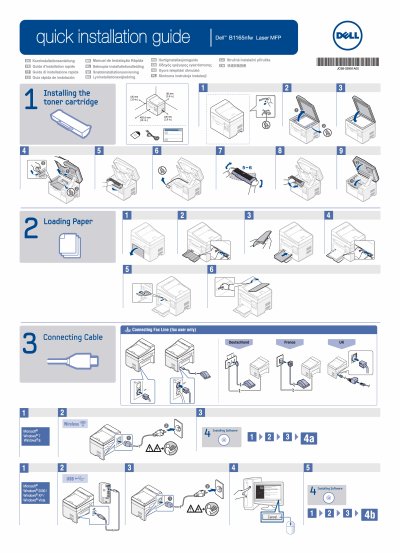

Dell Printer Installation Guide - cover page
Brand
DELL
Category
Printer
Document type
Installation Guide
Language
English
Pages
2
File format
PDF
File size
5.6 MB
Published
25 November, 2023
Updated
25 November, 2023
MD5 checksum
E87E7AE02C916D934D5ACD235FD4DAC9

About this manual

This quick installation guide from Dell Inc. helps users set up a Dell printer. It covers initial hardware setup and software installation for Windows, Mac, and Linux systems.

Topics include installing the toner cartridge, loading paper, connecting the fax line, selecting a connection method, and viewing the full user's guide. Safety guidelines are provided in the Product Information Guide.

What's inside

  • Installing the toner cartridge
  • Loading Paper
  • Connecting Fax Line
  • Installing Software
  • Viewing the User's Guide
  • Select a Connection Method
  • Connecting the device
  • Ready to Print!

Specifications

Platform supportMac, Linux, Windows

Frequently asked questions

Where can I download the software?

Go to http://www.dell.com/support in your computer's browser and follow the on-screen instructions.

What should I read before using the product?

Read the safety guidelines in the Product Information Guide before using the product.

Download PDF (5.6 MB)

More DELL Manuals


View all DELL manuals →