
The Dell Wyse 5000 Series Thin Client Wyse 5060 Quick Start Guide introduces the features and functions of the product.
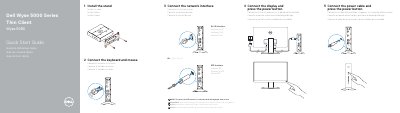
This guide provides step-by-step instructions to install the stand, connect peripherals, and power on the Wyse 5060 thin client. It details ports including USB, DisplayPort, network, and optional SFP interfaces. The device supports 10/100/1000 Base-T networking and includes regulatory compliance information for Mexico (NOM).
| Regulatory Model | N07D |
|---|---|
| Regulatory Type | N07D001 |
| Computer Model | Wyse 5060 |
| Input Voltage | 100 VAC–240 VAC |
| Input Current (Max) | 1.7 A |
| Input Frequency | 50 Hz–60 Hz |
| Output Current | 3.34 A |
| Output Voltage | 19.5 V |
Connect the power cable and press the power button.
Available ports include USB 2.0, USB 3.1 Gen 1, DisplayPort, network (10/100/1000 Base-T), and optional SFP interface.
The regulatory model is N07D, with regulatory type N07D001.