
The Dell Latitude 13 7000 Series Quick Start Guide provides information on how to set up and use your Dell Latitude 13 7000 Series laptop.
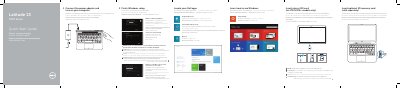
This Dell Quick Start Guide covers the Latitude 13 7000 Series, including the Latitude 7350 computer. It explains how to connect the power adapter, turn on the computer, finish Windows setup, insert an optional SD memory card or micro-SIM card, locate Dell apps, register the device, enable security and updates, connect to a network, and sign in to a Microsoft account.
The guide lists hardware features such as USB 3.0 and Mini-DisplayPort connectors, a Noble security-cable slot, a full-sized SD memory card reader, and optional NFC, fingerprint, security-card, and rear cameras. It also provides regulatory information, including regulatory model P58G and regulatory type P58G001, and support links at dell.com/support.
| USB 3.0 connector | Included |
|---|---|
| Noble security-cable slot | Included |
| Full-sized SD memory card reader | Included |
| Near Field Communication (NFC) reader | Optional |
| Fingerprint reader | Optional |
| Micro-SIM reader | LTE/HSPA+ models only |
No, the SD memory card is optional and sold separately.
The micro-SIM reader is available only on LTE/HSPA+ models.
Enter the password for the wireless network access when prompted.