
Dell Precision Tower 7810 Quick Start Guide

The Dell Precision Tower 7810 Quick Start Guide provides information on how to set up and use the Dell Precision Tower 7810 workstation.
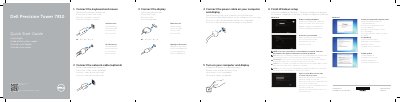

Dell Precision Tower 7810 Quick Start Guide - cover page
Brand
DELL
Category
Desktops
Document type
Quick Start Guide
Language
English
Pages
2
File format
PDF
File size
451 KB
Published
22 November, 2023
Updated
22 November, 2023
MD5 checksum
94362F6CAB067826677AFFAF74127EC3

About this manual

This document serves as a multilingual quick start guide for the Dell Precision Tower 7810 workstation. It provides step-by-step instructions for initial setup, including connecting peripherals like keyboards, mice, and network cables, as well as powering on the system and configuring Windows. The guide supports multiple languages including English, Dutch, French, Portuguese, and Spanish.

What's inside

  • Connect the keyboard and mouse
  • Connect the network cable
  • Connect the display
  • Connect the power cable
  • Turn on your computer
  • Create user name and computer name
  • Set password
  • Enable updates
  • Port identification
  • Regulatory information

Specifications

Regulatory ModelD01T
Input Voltage100 V CA–240 V CA
Input Current6 A
Input Frequency50 Hz–60 Hz

Frequently asked questions

What is the regulatory model number for this device?

The regulatory model number is D01T.

What is the input voltage range for this workstation?

The input voltage range is 100 V CA to 240 V CA.

What input frequency does this device support?

The device supports an input frequency of 50 Hz to 60 Hz.

Download PDF (451 KB)

More DELL Manuals


View all DELL manuals →