
This document describes how to connect a monitor, keyboard, mouse, power cord, and modem.
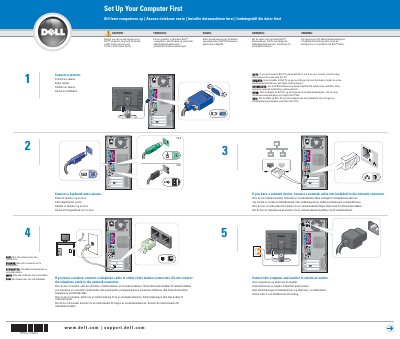
This document provides step-by-step instructions for setting up a Dell desktop computer in English, Danish, Finnish, Norwegian, and Swedish. It covers connecting a monitor, keyboard, mouse, power cables, modem, network, and audio devices, followed by turning on the system.
After the initial setup, the guide explains how to connect additional peripherals, access the Owner's Manual via the Windows desktop, and locate help resources for the Windows operating system. Safety warnings and trademark notices are included in all supported languages.
| USB 2.0 connectors | Front and back |
|---|---|
| Integrated sound | Present |
| Optional floppy drive | Supported |
| Headphone connector | Front panel |
Connect your speakers to the optional sound-card connectors and do not remove the cap.
Double-click the Owner's Manual icon on the Microsoft Windows desktop.
Click the Start button, then Help and Support, and select Microsoft Windows XP Tips.