
The Dell Dimension 5150C is a desktop computer that features: * An Intel Pentium 4 processor * 512MB of memory * An 80GB hard drive * A DVD drive * A 17-inch monitor * The Windows XP operating system
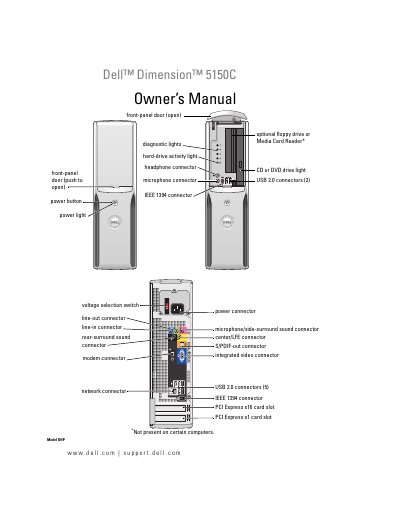
This document serves as the Owner's Manual for the Dell Dimension 5150C desktop computer. It covers essential topics including setting up the computer and peripherals, using the operating system, and managing power settings. The guide includes specific instructions for using features such as Intel Viiv Technology and Quick Resume Technology, as well as troubleshooting common hardware and software issues.
| Processor types | Intel Pentium 4 5XXX and 6XXX processors with Hyper-Threading technology, Pentium D 8XXX dual core processors, Intel Celeron D processors |
|---|---|
| Memory type | 400-MHz and 533-MHz DDR2 unbuffered SDRAM |
| Maximum memory | 4 GB |
| BIOS address | F0000h |
The manual lists recommended tools in the 'Before You Begin' section, though specific tool names are not detailed in the provided text.
You can clear forgotten passwords using the System Setup utility as described in the Appendix.
Dell Diagnostics are used to troubleshoot hardware and software problems when the computer encounters issues.