
User manual for Dell Dimension 8400 series desktop.
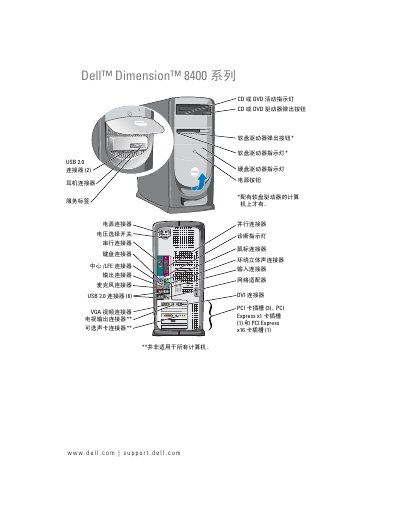
This user guide covers the setup and use of the Dell Dimension 8400 desktop computer, including connecting peripherals like printers, USB devices, and monitors. It details how to configure the system for internet connectivity, play media, and manage display settings. This manual is written in Chinese.
| Processor Type | Intel Pentium 4 with Hyper-Threading Technology |
|---|---|
| Memory Type | 400 MHz and 533 MHz DDR2 Unbuffered SDRAM |
| Maximum Memory | 4 GB |
| Chipset | Intel 925X Express or Intel 925XE Express |
| NIC | Integrated network interface, supports 10/100/1000 communication |
| Video Type | PCI Express |
You can enter the System Setup Program by pressing the appropriate key during startup, as described in the 'Entering the System Setup Program' section.
The maximum memory capacity for this system is 4 GB.
This computer supports 400 MHz and 533 MHz DDR2 non-buffered SDRAM.
The minimum memory required is 256 MB.