
Dell™ Dimension™ 5100 Model: DCSM User's Guide
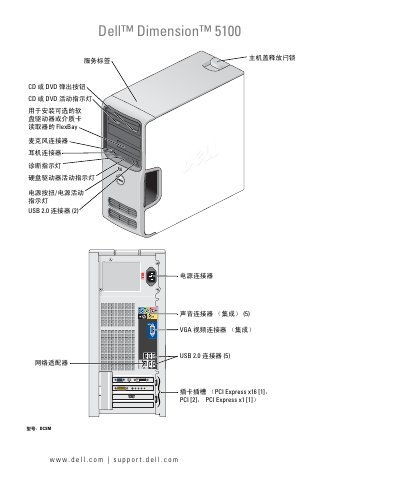
This document is the user guide for the Dell Dimension 5100 computer, model DCSM. It covers setting up and using the computer, including connecting peripherals like printers and networks, managing power, and adjusting display settings. The guide also provides detailed instructions for installing and removing internal components such as memory, hard drives, and optical drives. This manual is written in Chinese.
| Processor Type | Intel Pentium 4 with Hyper-Threading Technology |
|---|---|
| Memory Type | 400 MHz and 533 MHz DDR2 Unbuffered SDRAM |
| Maximum Memory | 4 GB |
| Video Type | Intel Integrated Graphics Media Accelerator 950 (GMA950) |
| Network Interface | Integrated 10/100 communication |
The maximum memory capacity is 4 GB.
You can enter the System Setup Utility by following the steps outlined in the 'Entering the System Setup Utility' section.