
The document describes how to set up a Dell computer.
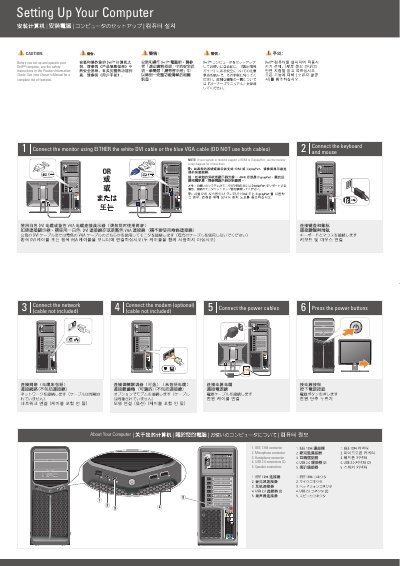
This document serves as a setup guide for the Dell XPS 630i computer. It details the physical connections required to set up the system, including the monitor, keyboard, mouse, network, and power cables. It explicitly advises users to use either the DVI or VGA cable for the monitor but not both simultaneously. The guide also references the Product Information Guide and Owner's Manual for safety instructions and a complete feature list.
Connect the monitor using either the white DVI cable or the blue VGA cable. Do not use both cables.
See the safety instructions in the Product Information Guide before setting up and operating the computer.