
This speaker uses side panel knob adjustment and remote control adjustment, with a signal-to-noise ratio of 85dBA and a distortion of 0.5%.
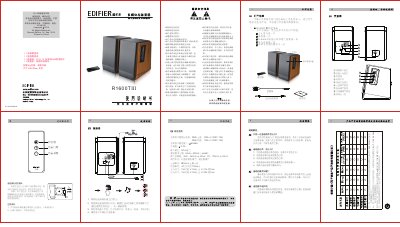
This is the Chinese-language user manual (Manual Edition 1.4, September 2014) for the Edifier R1600T III speaker system. It lists the box contents — main and sub speaker, remote control, 3.5 mm-to-dual-RCA audio cable, speaker connection cable, and manual with after-sales service card — and gives the safety instructions for placing, cleaning and using the speakers.
The manual labels the connectors and controls on the main speaker, explains how to connect the two speakers to an audio source and start playback, and describes the remote control keys and how to replace its CR2025 coin battery. A specifications section gives the amplifier output power, signal-to-noise ratio, distortion, input sensitivity and unit dimensions, and a troubleshooting section answers questions about no sound, noise and an unresponsive remote. This manual is written in Chinese.
| Amplifier Output Power (Treble) | RMS 13 W × 2 (DRC ON) |
|---|---|
| Amplifier Output Power (Bass) | RMS 17 W × 2 (DRC ON) |
| Signal-to-Noise Ratio | 85 dBA |
| Input Ports | RCA connectors |
| Frequency Response | 65 Hz – 20 kHz (±6 dB) |
| Input Sensitivity | AUX 550 mV ± 50 mV; PC 700 mV ± 50 mV |
| Tweeter Unit | Φ19 mm silk dome tweeter |
| Woofer Unit | 4 inch (outer diameter 116 mm) |
| Main Speaker Dimensions | 154 (W) × 254 (H) × 214 (D) mm |
| Sub Speaker Dimensions | 154 (W) × 254 (H) × 209 (D) mm |
| Power Supply | 100-240 V, 50/60 Hz, 40 W |
The package contains one main speaker and one sub speaker, a remote control, a 3.5 mm headphone-plug-to-dual-RCA audio cable, a speaker connection cable, and the manual with the after-sales service card.
Connect the two speakers with the speaker connection cable, plug the dual RCA end into the line input on the main speaker's rear panel and the other end into the audio source, then connect the power cord, switch on and play music.
First check whether the cable between the speakers is properly connected; if the problem remains, try another audio source and contact after-sales service if the speaker is still faulty.
Check whether the remote's battery still has power and is installed correctly, and whether the remote window or the receiver on the speaker is covered.