
This document describes how to use a microscope, including how to turn on the power, how to set the objective lens, how to turn on the illumination lamp, and how to configure the motorized functions.
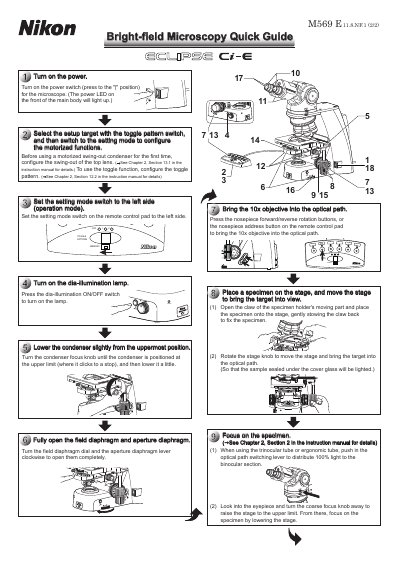
This quick guide outlines the basic bright-field microscopy workflow for the Nikon ECLIPSE Ci-G microscope. It covers powering on, selecting the setup target and setting mode, turning on the dia-illumination lamp, opening the diaphragms, placing a specimen, and focusing.
It also describes focusing and centering the condenser, selecting objectives, adjusting diopter and interpupillary distance, adjusting aperture and field diaphragms, viewing the specimen, and powering off. Notes warn against rotating the right and left focus knobs in opposite directions and turning the coarse focus knob past its limit.
Press the power switch to the '|' position; the power LED on the front of the main body lights up.
Adjust it to 70 to 80% of the numerical aperture of the objective used.
Do not rotate the right and left focus knobs in opposite directions, and do not turn the coarse focus knob past its limit point.
Look into both eyepieces and rotate the binocular part until the fields of view for both eyes coincide.