
This document is about Pantech ADR930 Perception User Manual, it introduces how to install the battery, how to use the basic functions of the phone and how to maintain the phone.
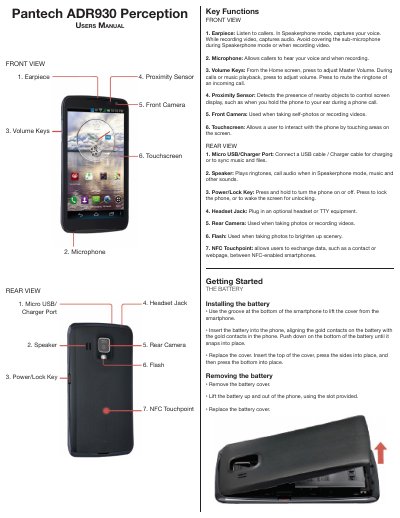
This user manual is for the Pantech ADR930 Perception smartphone. It explains battery installation and removal, front and rear key functions, and basic operations such as Wi-Fi, Bluetooth, internet access, camera, messaging, voicemail, calls, locking, and charging.
The manual also includes numbered front and rear view diagrams and step-by-step instructions for common phone tasks.
From the Home screen, swipe downward to display the Notification Panel, touch Wi-Fi, then swipe the toggle switch from Off to On.
Insert the small end of the charger cable into the Micro USB/Charger port, then plug the large end of the charger into an electrical outlet.
Press the Power/Lock Key to turn the screen on, then swipe the lock icon.
From the Home screen, touch Applications > Camera, compose the picture, then touch the Camera button.