
Citizen watch instruction manual, introduces how to use the watch's display, buttons, hands, lights, notifications and other functions.
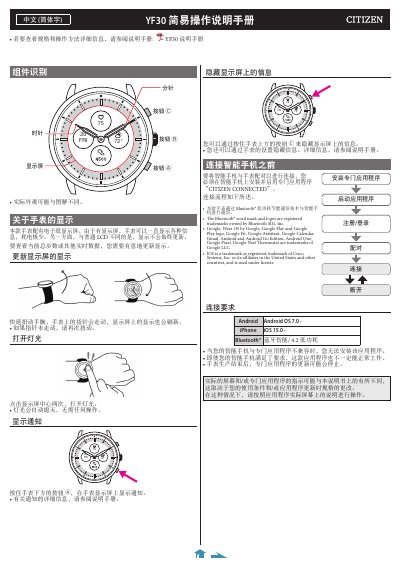
This is the simple operation instruction manual for the Citizen YF30 smart watch. It describes the watch components and buttons, the electronic paper display, how to refresh the display, turn on the light, and show or hide notifications.
It also explains how to install the CITIZEN CONNECTED app, pair the Citizen YF30 with an Android or iPhone, reconnect after pairing problems, sync data, and set the time and calendar automatically through the phone. The watch menu is operated using buttons A, B, and C. This manual is written in Chinese.
| Display type | Electronic paper display |
|---|---|
| Wireless communication | Bluetooth low energy |
| Android requirement | Android OS 7.0 |
| iOS requirement | iOS 15.0 |
| Bluetooth version | Bluetooth 4.2 low energy |
| Sync distance | 10 m or more |
Quickly twist your wrist; the watch hands move and the display refreshes.
Tap the center of the display twice.
Use the dedicated app CITIZEN CONNECTED.
No. The watch receives time information from the smartphone each time it connects and adjusts automatically.