
This document provides a quick start guide to the Creative Sound BlasterX Katana.
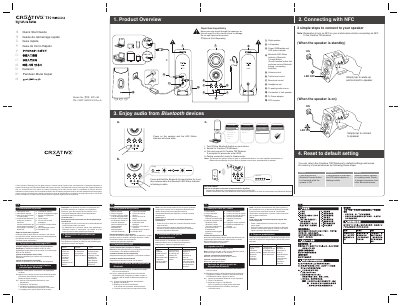
This Quick Start Guide covers the Creative T30 Wireless Bluetooth speaker from Creative Technology Ltd. It identifies the right and left speakers, power and LED indicators, volume and tone controls, headphone output, analog audio source input, left speaker connection, power adapter, and NFC receptor.
It explains how to connect using NFC and Bluetooth, including pairing steps and the default passcode 0000. The guide also includes safety warnings about objects and liquid entry, notes that optional items are sold separately, and describes how to reset the speaker to default settings by holding the Bluetooth Connect button for 8 seconds.
| Bluetooth passcode | 0000 |
|---|---|
| Bluetooth pairing hold time | 3 seconds |
| Reset hold time | 8 seconds |
If prompted for a passcode, enter 0000.
Press and hold the Bluetooth Connect button for 8 seconds while the speaker is on. A voice prompt is heard and the LED status indicator blinks white.
Yes. Press the Bluetooth Connect button once when the speaker is on, or initiate a connection from your Bluetooth device while the speaker is on and not connected to any other Bluetooth device.