
This document is the summary of Osmo Mobile 3 Quick Start Guide. It introduces the features and characteristics of Osmo Mobile 3, including installation and operation.
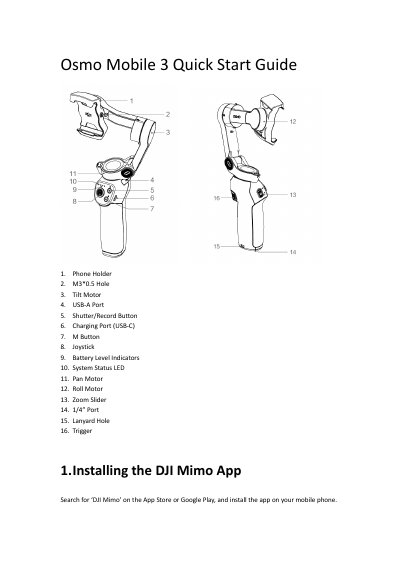
The DJI Osmo Mobile 3 is a smartphone gimbal. This quick start guide explains installing the DJI Mimo app, powering the device on and off, charging it, and mounting and balancing a mobile phone. It also describes Bluetooth connection, control operations, storage, specifications, and compliance information.
The specifications list dimensions, weight, mechanical range, wireless mode, and battery details. The guide includes FCC, ISED, KCC, NCC, EU, and other regional compliance notices.
| Name | OSMO MOBILE 3 |
|---|---|
| Model | OF100 |
| Dimensions (unfolded) | 286x126x98 mm |
| Dimensions (folded) | 157x130x46 mm |
| Weight | 405 g |
| Consumption | 1.2 W (steady and balanced status) |
| Mechanical Range | Pan: +170°; Roll: -85° to +252°; Tilt: -104° to +235° |
| Max Controllable Speed | 120°/s |
| Wireless Mode | Bluetooth Low Energy 5.0 |
| Operation Frequency Range | 2400~2483.5 MHz |
| Battery Type | 18650 Li |
| Battery Capacity | 2600 mAh |
| Battery Energy | 18 Wh |
| Battery Voltage | 7.2 |
| Charging Temperature | 41° to 104° F (5° to 40° C) |
| Operating Temperature | 32° to 104° F (0° to 40° C) |
| USB Adapter Charging Time | 3.5 hours (at 2 A) |
| Max Run-Time | 15 hours |
DJI Mimo is installed from the App Store or Google Play.
It takes 3.5 hours when charging at 2 A.
Press and hold the button to power it on or off.
The maximum run-time is 15 hours.