
The AW-FET-053C-120 is a 4 port 10/100BaseT PoE switch capable of feeding 15.4/30W (54V max. per port) power to Power over Ethernet (PoE) devices. It comes with another 1x FE RJ45 uplink port. The switch is capable of a total of 120 Watts PoE power budget. EX mode in 802.3af (15.4W): camera connection up to 250m.
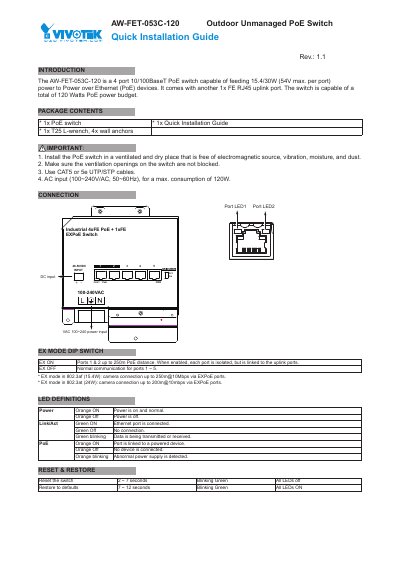
The VIVOTEK AW-FET-053C-120 is a 4 port 10/100BaseT PoE switch with one FE RJ45 uplink port. It accepts 100~240VAC input and provides a total PoE power budget of 120 Watts, delivering 15.4/30W per port to connected devices.
This Quick Installation Guide describes package contents, LED definitions, installation requirements, EX mode operation for extended PoE distance, reset and restore procedures, and outdoor mounting on pole-mount or corner-mount brackets.
| Ethernet ports | 4 port 10/100BaseT PoE |
|---|---|
| Uplink port | 1x FE RJ45 |
| AC input | 100~240V/AC, 50~60Hz |
| Max power consumption | 120W |
| PoE power budget | 120 Watts |
| PoE power per port | 15.4/30W, 54V max |
| EX mode distance | Ports 1 & 2 up to 250m |
The package includes a PoE switch, Quick Installation Guide, T25 L-wrench, and wall anchors.
Reset the switch by holding for 2 to 7 seconds; all LEDs blink green and turn off.
EX mode enables ports 1 and 2 for up to 250m PoE distance and isolates them from normal communication.
Orange ON means power is on and normal; orange off means power is off.