
This document mainly introduces how to use the FAGOR 8055 desktop lathe to perform basic operations, including finding reference points, calling tools, and assigning values to tools.
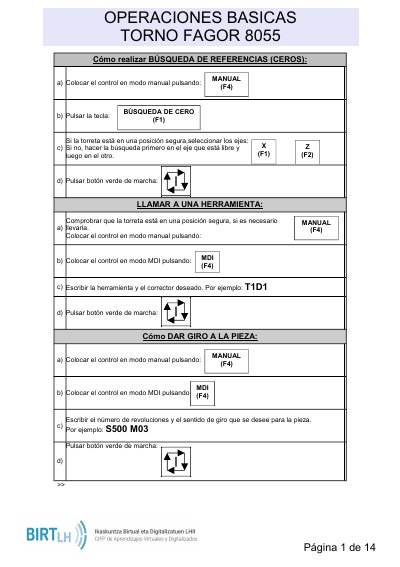
This manual provides instructions for basic operations of the FAGOR 8055 desktop lathe, including searching for reference points, calling tools, rotating the workpiece, and setting tool offsets. It also covers simulation procedures for programming verification. All steps are described using manual and MDI modes with specific key presses and commands. This manual is written in Spanish.
Place the control in manual mode by pressing F4, then press F1 for zero search. Select axes X and Z if needed, then press the green start button.
Ensure the turret is in a safe position. Place the control in manual mode by pressing F4, then place it in MDI mode by pressing F4. Enter the tool and corrector, e.g., T1D1, then press the green start button.
Place the control in manual mode by pressing F4, then place it in MDI mode by pressing F4. Enter the desired RPM and rotation direction, e.g., S500 M03, then press the green start button.