
This file is the quick start guide of the edge-core EAP104 (WW) access point.
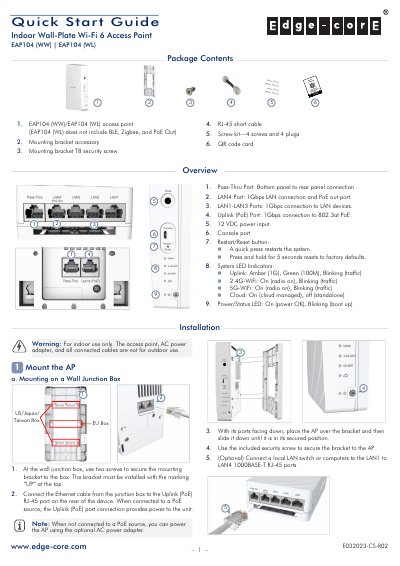
This guide provides installation instructions for the edge-core EAP104 (WW) and EAP104 (WL) indoor wall-plate Wi-Fi 6 access points. It covers three mounting methods: on a wall junction box, on a wall without a junction box, and using an optional desktop stand. The document also describes the package contents, port layout, LED indicators, and power options including PoE and an optional AC adapter.
Initial setup options include QR code onboarding via a phone, registration through the ecCLOUD controller, or connecting to the web interface via a LAN port. The web interface launches a setup wizard for configuring the AP in cloud-managed, controller-managed, or stand-alone mode. Safety and regulatory information for FCC and Industry Canada is also included.
| Uplink (PoE) Port | 1Gbps 802.3at PoE |
|---|---|
| Pass-Thru Port | Bottom panel to rear panel connection |
| Power Input | 12 VDC or PoE 802.3at |
| Console Port | Present |
| Reset Button | Quick press restarts; hold 5 seconds for factory reset |
| Default LAN IP Address | 192.168.2.1 |
| Fallback Uplink IP Address | 192.168.1.10 |
| Wi-Fi Standard | Wi-Fi 6 (2.4 GHz and 5 GHz) |
| Management Modes | ecCLOUD, EWS-Series controller, stand-alone |
The default IP address is 192.168.2.1 when connected via a LAN port.
Press and hold the Restart/Reset button for 5 seconds.
Amber indicates 1G link, Green indicates 100M link, and blinking indicates traffic.
Yes, using the optional AC power adapter.