
Key facts
- Manuals
- 2
- Languages
- EN
- Last added
- 2026-09-30
Featured Edge-core manuals
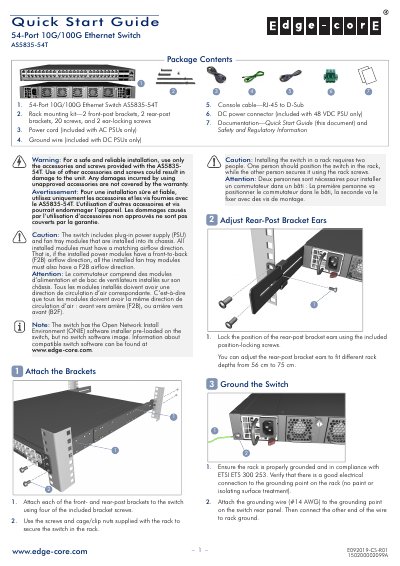
Edge Core AS5835-54T 54-Port 10G/100G Ethernet Switch Quick Start Guide
This guide provides step‑by‑step instructions for installing the AS5835-54T switch, including attaching front‑ and rear‑post brackets, grounding the chassis, and connecting power supplies. It also explains how to verify LED status, boot the switch with the ONIE installer, and connect network cables for both RJ‑45 and QSFP28 ports.
Technical details such as chassis dimensions, weight, operating temperature ranges, power ratings, and regulatory compliance are listed, helping installers ensure the switch meets environmental and safety requirements.
Covers: Attach the Brackets · Ground the Switch · Connect Power · Verify Switch Operation · Perform Initial System Boot · Connect Network Cables
Edge-core VST3300 Series IP PBX Operation Manual
The VST3300 Series is an all‑in‑one IP PBX that combines traditional PBX, IP‑PBX, SIP server and SIP client functions in a single device. It supports analog and SIP extensions, fax, and voice mail, offering high‑quality voice communication over an Internet connection.
This manual covers safety instructions, installation steps, detailed configuration of extensions, trunks, SIP devices, conference calls, firmware updates, and backup procedures. It also includes parameter tables for DNS settings, service ports, remote management, and VAD control, as well as troubleshooting guidance.
Covers: Safety Instructions · Preface · Feature Overview · Extension Planning and Configuration · Trunk and SIP Configuration · Analog PBX Connection
Latest Edge-core manuals
Edge Core AS5835-54T 54-Port 10G/100G Ethernet Switch Quick Start Guide
Quick Start Guide 9 pages · 1.7 MB · ENQuick Start Guide for the Edge Core AS5835-54T 54‑port 10G/100G Ethernet Switch, covering installation, power connection, and basic operation.
Edge-core VST3300 Series IP PBX Operation Manual
User Manual 103 pages · 1.6 MB · ENThe Edge-core VST3300 Series IP PBX Operation Manual provides setup, configuration, and usage instructions for the all‑in‑one IP PBX system.
Which document do I need?
Quick Start Guide
The shortest path to a working setup, usually only a few pages.
User Manual
Day-to-day operation, settings and troubleshooting. Start here if the product is already set up.
Questions answered in Edge-core manuals
How many power supply units can be installed in the AS5835-54T?
The switch supports up to two AC or DC PSUs, and both must have the same airflow direction as the installed fan tray.
From: Edge Core AS5835-54T 54-Port 10G/100G Ethernet Switch Quick Start Guide
What LED color indicates 10 Gbps mode on RJ‑45 ports?
Green LEDs indicate 10 Gbps mode on RJ‑45 ports.
From: Edge Core AS5835-54T 54-Port 10G/100G Ethernet Switch Quick Start Guide
How can I reset the password of an individual extension line?
Enter the two‑digit extension number (11‑26) and the system will reset the password to the default blank value.
What is the default setting for VAD control?
VAD control is enabled by default.