
Installation and setup instructions for the Edge-Core AS9716-32D, covering rack mounting, power connection, network cabling, and hardware specifications.
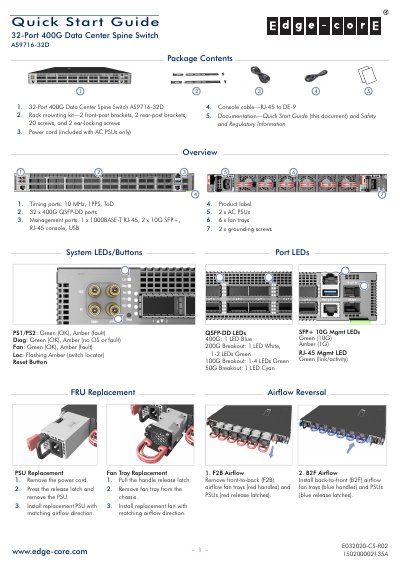
This document serves as a quick start guide for the Edge-Core AS9716-32D 32-Port 400G Data Center Spine Switch. It details the package contents, including rack mounting kits, power cords, and console cables, and provides step-by-step instructions for B2F and F2B airflow configurations.
| Ports | 32 x 400G QSFP-DD ports, 1 x 1000BASE-T RJ-45, 2 x 10G SFP+, RJ-45 console, USB |
|---|---|
| Chassis Size (WxDxH) | 438.4 x 536 x 43.1 mm |
| Weight | 11.06 kg (24.38 lb) |
| Operating Temperature | 0° C to 45° C |
| Power Consumption | 1300 Watts maximum |
The configuration is 115200 bps, 8 characters, no parity, one stop bit, 8 data bits, and no flow control.
Information is available at www.edge-core.com.