
This manual introduces the installation and usage of DVI EDID Emulator, which can clone/copy the EDID information from a display and provide it to the remote display to extend the life of the displays.
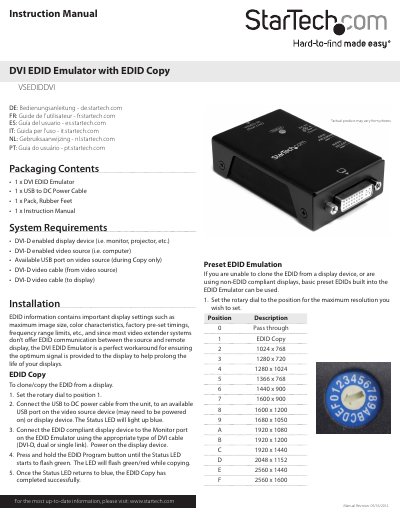
This instruction manual for the StarTech DVI EDID Emulator with EDID Copy explains how the unit stores and provides EDID information to a display when a video extender system does not pass EDID communication between the source and the remote display. It lists the packaging contents, including the emulator, a USB to DC power cable, a pack of rubber feet and the manual, and the system requirements such as a DVI-D enabled source, a DVI-D enabled display and DVI-D cables.
The manual describes the EDID Copy procedure using the EDID Program button and the Status LED, and the preset EDID emulation mode selected with the rotary dial, whose positions run from pass through (0) and EDID Copy (1) to fixed resolutions up to 2560 x 1600. It also gives the physical installation steps, an optional USB power connection for video cards that do not supply enough power through the DVI cable, a specifications table, and FCC compliance, technical support and warranty statements.
| Input Video Signal | DVI-D (digital) |
|---|---|
| Output Video Signal | DVI-D (digital) |
| Connectors | 2 x 29-pin DVI-I dual link female, 1 x DC Power |
| LEDs | 1 x Status |
| Maximum Video Resolution | 2560 x 1600 |
| Power Adapter | Optional: 5V DC to USB |
| Enclosure Material | Metal |
| Operating Temperature | 0°C ~ 40°C (32°F ~ 104°F) |
| Storage Temperature | -20°C ~ 60°C (-4°F ~ 140°F) |
| Humidity | 0% ~ 80% RH |
| Dimensions | 80.0mm x 52.0mm x 22.0mm |
| Weight | 123g |
Set the rotary dial to position 1, power the unit from an available USB port, connect the display to the Monitor port, then press and hold the EDID Program button until the Status LED starts to flash green. When the LED returns to blue, the EDID copy is complete.
You can use the basic preset EDIDs built into the EDID Emulator by setting the rotary dial to the position for the maximum resolution you want. Position 0 is pass through and position 1 is EDID Copy.
Connect the included power adapter cable from the EDID Emulator to an available USB port on the video source or the display.
The package contains 1 x DVI EDID Emulator, 1 x USB to DC Power Cable, 1 x pack of rubber feet and 1 x Instruction Manual.