
This document describes the main features and settings of the LiveSight sensor. Since the sensor can be adapted to different display devices, this document may not cover key reference information for specific products. In addition to this quick guide, you should also use the documentation for the display device at the same time to have a full understanding of how to use and adjust LiveSight images.
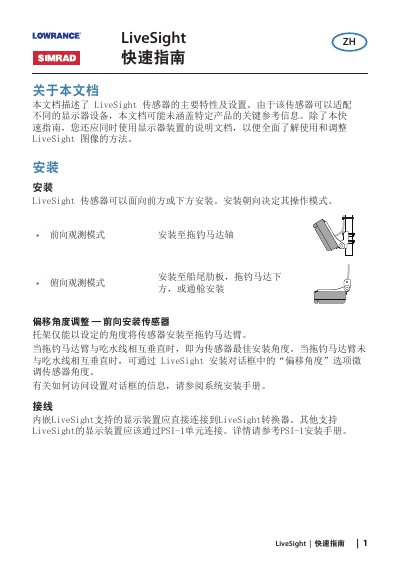
The LiveSight sensor is a sonar unit that can be mounted facing forward or facing down, and the mounting orientation determines its operation mode. Forward-looking mode mounts the sensor on the trolling motor shaft; down-looking mode mounts it on the transom, below the trolling motor, or in a through-hull installation. The bracket mounts the sensor to the trolling motor arm at a set angle, and when the arm is not perpendicular to the waterline the sensor angle can be fine-tuned with the Offset Angle option.
On first startup or after a restart, the display recognizes any unconfigured LiveSight sensor and the setup wizard starts automatically; the installation mode must be defined in the wizard or installation dialog before the LiveSight icon appears on the home page. Several LiveSight sources run independently and each can be assigned to a panel. Two user modes are available: Automatic with predefined image settings, and Custom for user-defined image settings. The main menu covers stopping sonar pings, trails, palettes, range grid, recording video to a memory card in .mp4 format, range, depth, detail and sensitivity, plus noise rejection. This manual is written in Chinese.
| Video recording format | .mp4 |
|---|---|
| Display connection | Directly to the LiveSight converter, or through a PSI-1 unit |
| Built-in user modes | Automatic and Custom |
It can be mounted facing forward or facing down; the mounting orientation determines the operation mode.
The optimal angle is when the trolling motor arm is perpendicular to the waterline; otherwise the angle can be fine-tuned with the Offset Angle option.
The installation mode (forward or down) must be defined in the wizard or the installation dialog.
All LiveSight videos are recorded in standard .mp4 format and saved to the memory card, suitable for playback on a computer or sharing online.