
This document is the instruction manual for SOYAL ACCESS CONTROL SYSTEM AR-721KP
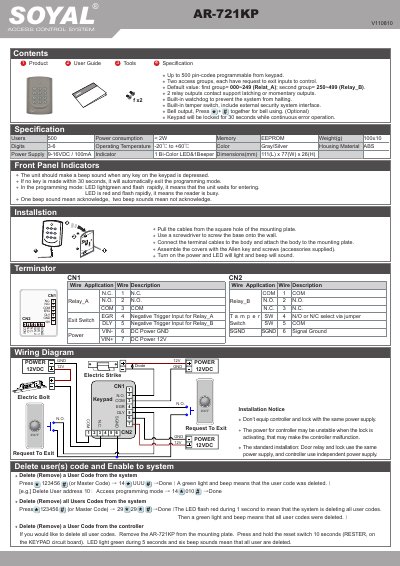
This document provides installation and programming instructions for the SOYAL AR-721KP access control system. It covers wiring diagrams, power requirements, and user code management. The system supports up to 500 pin-codes and two access groups with relay outputs. Programming is done via a keypad with specific command sequences. The unit includes a bi-color LED indicator and beeper for status feedback. Installation requires mounting, wiring, and power supply setup as specified.
| Power Supply | 9-16VDC / 100mA |
|---|---|
| Power Consumption | < 2W |
| Memory | EEPROM |
| Operating Temperature | -20℃ to +60℃ |
| Dimensions | 111(L) x 77(W) x 26(H) mm |
| Weight | 100±10 g |
| User Codes | Up to 500 pin-codes programmable |
| Housing Material | ABS |
| Color | Gray/Silver |
Press 123456 (or Master Code) → 14 UUU → Done. A green light and beep confirm deletion.
Remove the unit, press and hold the reset switch for 5 seconds. LED lights green for 2.5 seconds and five beeps confirm reset to default code 123456.
Enter programming mode → 02 TTT. TTT = 000 (Output constantly) or 001~600 (1-600 seconds) or 601~609 (0.1-0.9 seconds).