
This document describes the installation method of ONEPRO™ KOP4800 antenna, including the placement of the antenna and the installation steps, as well as the warranty policy of the antenna.
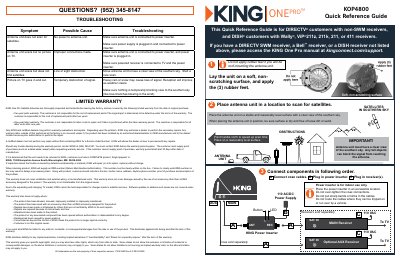
The KING One Pro KOP4800 Quick Reference Guide covers setup and use of the One Pro satellite antenna. It is intended for DIRECTV customers with non-SWM receivers and DISH customers with Wally, ViP211z, 211k, 211, or 411 receivers; users with other receivers are directed to the full manual at kingconnect.com/support.
The guide explains placing the antenna unit on a stable, reasonably level surface with a clear view of the southern sky, applying the three rubber feet unless roof-mounting, and pointing the handle north to speed up scan time. It then shows connection order for coax, the indoor power inserter and receivers, receiver setup for DIRECTV and DISH, scan operation through the power inserter button, LED status patterns, troubleshooting, and the limited warranty.
| Supported DIRECTV receivers | Non-SWM receivers |
|---|---|
| Supported DISH receivers | Wally, ViP211z, 211k, 211, or 411 receivers |
| Power supply | 110 AC/DC power supply |
| Parts warranty | Two years |
| Labor warranty | One year |
| Power inserter use | Indoor use only |
It is for DIRECTV customers with non-SWM receivers and DISH customers with Wally, ViP211z, 211k, 211, or 411 receivers.
Press and release the power inserter button.
When the scan is complete and satellites are found, the LED turns steady green.
It may lock on in as little as 2 minutes, but can occasionally take up to 10-15 minutes.