
This is a user manual for a Casio watch
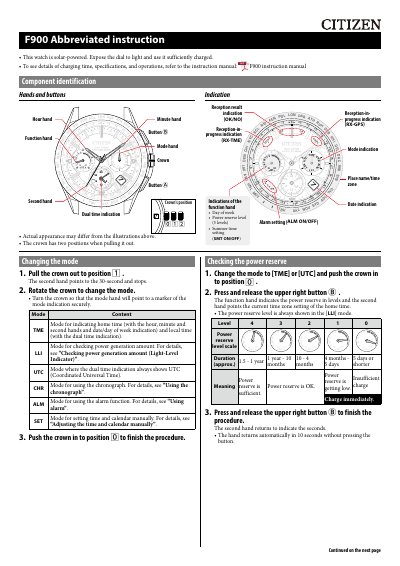
This is a user manual for the Citizen F900 watch, a solar-powered timepiece with GPS capabilities. It explains how to operate the watch’s various functions including time and date settings, dual time display, chronograph, alarm, and leap second adjustments. The manual also covers how to check power levels and reception results using the light-level indicator and GPS signal status.
The watch features a crown with two positions for mode selection and time adjustments. It includes a world time function with 40 time zones, automatic time and calendar updates via GPS, and manual setting options. The manual provides step-by-step instructions for each feature, including how to set the home and local time, adjust for summer time, and use the chronograph and alarm functions.
Change the mode to [TME] or [UTC], push the crown to position [0], then press and release the upper right button. The function hand will indicate the power reserve level.
Change the mode to [TME] or [LLI], pull the crown to position [2], press and release the upper right button to set the local time, then rotate the crown to choose a time zone.