
This document is about the user manual of Extech Hygro-Thermometer Pen Model 445580.
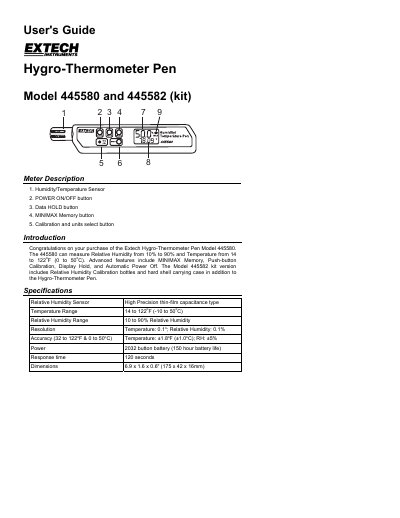
This guide explains how to operate the Extech Hygro-Thermometer Pen Model 445580, including turning it on, using data hold and min/max memory, and calibrating it with salt reference bottles. It also details error messages, automatic power-off, unit selection, and warranty information.
The device measures relative humidity from 10% to 90% and temperature from 14°F to 122°F (0°C to 50°C) with ±1.8°F and ±5% accuracy. Calibration requires 33% and 75% RH reference bottles, and the meter automatically shuts off after 20 minutes of inactivity.
| Temperature Range | 14 to 122 °F (-10 to 50 °C) |
|---|---|
| Relative Humidity Range | 10 to 90% |
| Temperature Accuracy | ±1.8 °F (±1.0 °C) |
| Power | 2032 button battery |
| Dimensions | 6.9 x 1.6 x 0.6" (175 x 42 x 16mm) |
Insert the sensor into 33% and 75% salt reference bottles, hold the CAL button with a paper clip, press ON/OFF, and follow the on-screen prompts to complete calibration.
It indicates a calibration error, and recalibration is necessary.
Press and hold the MIN/MAX button while turning the meter on, then release the ON/OFF button after initialization.
Turn the meter off, press and hold the F/C button, press ON/OFF, release F/C when F and C icons appear, press MIN/MAX to select C or F, then press F/C to store the selection.