
This document is the instruction manual for E660 watch, which introduces the basic functions and operation methods of the watch.
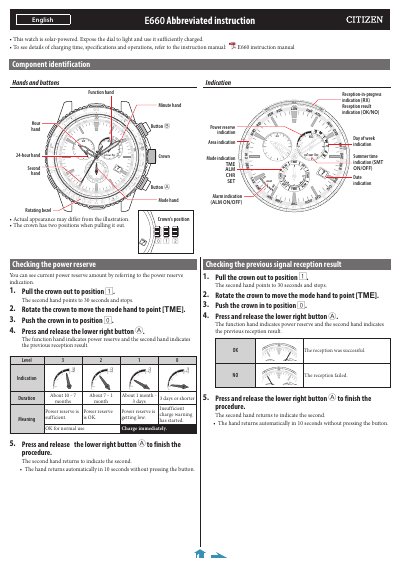
This manual explains how to operate the Citizen E660 solar-powered watch, including checking power reserve, setting world time, configuring summer time, and manually adjusting time and calendar. It also covers receiving time signals, resetting the watch, and correcting reference positions. The watch uses a crown with two positions and buttons for navigation and adjustment.
The manual includes a table of time zones and representative areas, with notes on reception limitations and automatic summer time settings for specific regions like the USA and Germany.
The E660 supports 24 time zones, including UTC offsets from -12 to +14, with representative areas such as London, Paris, Tokyo, and New York.
Pull the crown to position 2, rotate to select a time zone, press the upper right button while hands stop. Pressing the button alternates between SMT ON and SMT OFF. Automatic switching is available for groups like USA and Germany.
After All Reset, the watch resets to January 1, Sunday of leap year, world time set to LON, summer time set to SMT OFF, alarm set to ALM OFF, alarm time to 0:00 AM, and reception result to NO.