
Philips EPIQ Elite 4.0 Contrast Enhanced Ultrasound Quick Guide

This guide provides instructions on how to perform ultrasound contrast imaging on SonoSite ultrasound systems.
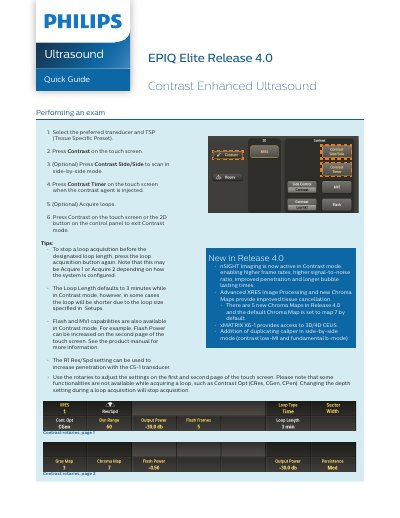

Philips EPIQ Elite 4.0 Contrast Enhanced Ultrasound Quick Guide - cover page
Brand
Philips
Document type
Quick Start Guide
Language
English
Pages
2
File format
PDF
File size
649 KB
Published
17 October, 2023
Updated
17 October, 2023
MD5 checksum
56C3DD3C359CFCEE72C8653A5A5A270E

About this manual

This quick guide outlines steps to perform contrast-enhanced ultrasound exams using the Philips EPIQ Elite 4.0 system. It covers selecting transducers, activating contrast mode, and managing loop acquisitions. New features in Release 4.0 include nSIGHT Imaging, advanced XRES processing, and 3D/4D CEUS support via the xMATRIX X6-1 transducer. Quantification of contrast loops is also supported using ROI in QLAB.

What's inside

  • Performing an Exam
  • Contrast Mode Settings
  • Loop Acquisition
  • Quantifying Contrast Loops with ROI
  • New Features in Release 4.0

Frequently asked questions

How do I activate contrast mode?

Press Contrast on the touch screen.

What is the default loop length in contrast mode?

The Loop Length defaults to 3 minutes, but may be shorter depending on setup.

Download PDF (649 KB)

More Philips Manuals


View all Philips manuals →