
Citizen U600 Solar World Time Watch Instruction Manual

This is a watch instruction manual.
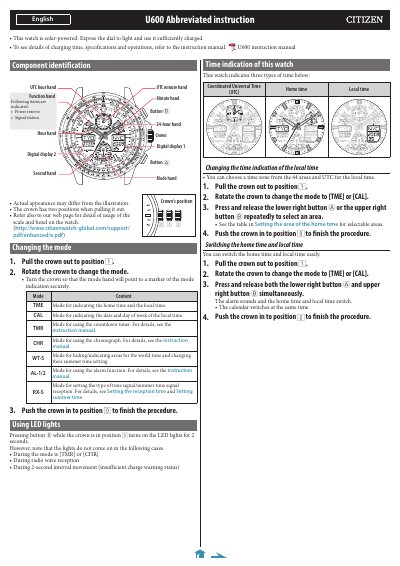

Citizen U600 Solar World Time Watch Instruction Manual - cover page
Brand
Citizen
Category
Watches
Document type
User Manual
Language
English
Pages
4
File format
PDF
File size
739 KB
Published
13 October, 2023
Updated
13 October, 2023
Model
U600
MD5 checksum
5DE7A1CBF9EF78ED30EE696C296775DA

About this manual

The Citizen U600 is a solar-powered watch featuring world time functionality with 44 selectable areas. It automatically receives time signals from stations in the USA, Europe, or Japan to adjust the local time and calendar. The watch also includes functions for alarms, chronographs, countdown timers, and LED lights.

What's inside

  • Component identification
  • Changing the mode
  • Using LED lights
  • Time indication
  • Checking power reserve
  • Setting the area of home time
  • Receiving the signal manually
  • Activating summer time

Specifications

Power SourceSolar-powered
Signal Reception Frequency2:00 AM every day
Selectable Areas44 areas and UTC

Frequently asked questions

How long does it take to receive the signal manually?

It takes approximately 2-15 minutes to finish reception.

When do LED lights not turn on?

The lights do not come on during the TMR or CHR modes, during radio wave reception, or when an insufficient charge warning is active.

What does the function hand indicate regarding power?

The function hand indicates the power reserve amount in levels ranging from sufficient to insufficient charge warning.

Download PDF (739 KB)

More Citizen Manuals


View all Citizen manuals →