
This is a quick guide to the KX-PX20M model, which explains how to connect the power supply and use the remote control. It also reminds users to avoid touching the power cord during thunderstorms and to only use the included adapter and power cord.
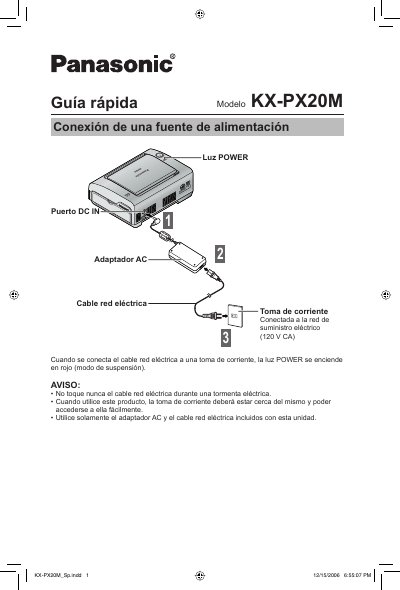
This document is a quick start guide for the Brother KX-PX20M dot matrix printer. It provides instructions on connecting the power supply, installing batteries in the remote control, and handling the paper and ink cartridges. The guide includes specific warnings regarding the use of compatible paper and ink kits to prevent jams and ensure print quality. This manual is written in Spanish.
| Remote Control Range | Up to 7 m (23') |
|---|---|
| Power Supply Voltage | 120 V AC |
| Remote Control Battery Type | CR2025 |
The remote control requires a CR2025 coin cell battery.
The remote control has an operating range of up to 7 meters (23 feet).
No, you must use only the specific paper and ink cartridges sold as kits to avoid jams and poor quality.