
This document introduces the features and characteristics of the 350, including the brand, model, and product name.
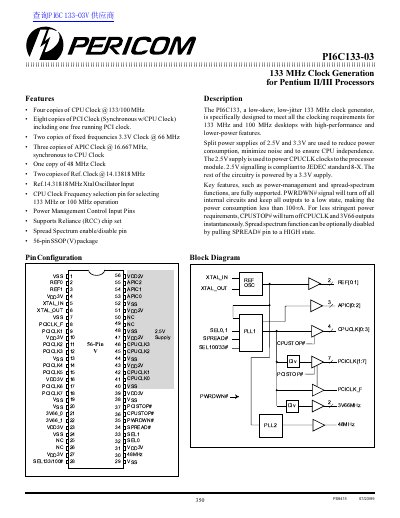
The PI6C133-03 is a low-skew, low-jitter clock generator specifically designed to meet the clocking requirements for 133 MHz and 100 MHz desktops using high-performance and lower-power Pentium II/III processors. The device generates four copies of the CPU Clock at 133 or 100 MHz, eight copies of the PCI Clock (including one free-running), two copies of a fixed 66 MHz clock, three copies of an APIC clock, one copy of a 48 MHz clock, and two copies of reference clocks.
The device utilizes split power supplies of 2.5V and 3.3V to reduce power consumption and minimize noise, ensuring CPU independence. It supports key features such as Reliance (RCC) chipset compatibility and spread spectrum functions. Power management is controlled via PWRDWN# and CPUSTOP# inputs, allowing the device to enter low-power states with specific latency requirements.
| CPU Clock Frequency | 133 MHz or 100 MHz |
|---|---|
| PCI Clock Copies | Eight copies (including one free running) |
| Fixed 3.3V Clock Frequency | 66 MHz |
| APIC Clock Copies | Three copies |
| Reference Clock Frequency | 14.31818 MHz |
| Package Type | 56-pin SSOP(V) |
| Power Consumption (Powerdown) | Less than 100A |
The SEL133/100# pin selects between 133 MHz and 100 MHz operation.
Asserting PWRDWN# turns off all internal circuits and keeps outputs low, reducing power consumption to less than 100A.
Yes, by pulling the SPREAD# pin to a HIGH state.