
Panasonic TY-32G22M Video Stand Assembly Instructions


Panasonic TY-32G22M Video Stand Assembly Instructions - cover page
Brand
Panasonic
Document type
User Manual
Language
English
Pages
4
File format
PDF
File size
1.4 MB
Published
03 August, 2012
Updated
03 August, 2012
MD5 checksum
338B021A5ABFA6C6C97385090FC2992D

About this manual

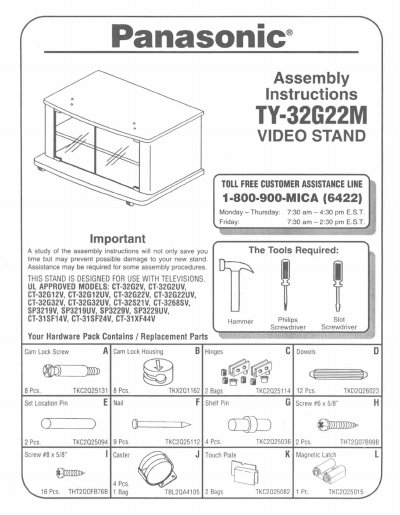
This document provides assembly instructions for the Panasonic TY-32G22M video stand. It details the contents of the hardware pack, listing specific parts such as cam lock screws, dowels, hinges, shelf pins, and touch plates with their corresponding part numbers.

The guide includes step-by-step procedures for assembling the main unit and installing the glass doors. It also specifies which television models are compatible with the stand based on mounting hole locations and provides a list of replacement parts.

What's inside

  • Hardware Pack Contents
  • Tools Required
  • Assembly Steps
  • Glass Door Installation
  • Television Placement
  • Replacement Parts List
  • Cleaning Instructions

Frequently asked questions

What type of television is this stand designed for?

This stand is designed specifically for use with televisions.

Which hole should I use to mount a CT-32G22V television?

You must place the television in Hole B for that model.

What cleaning method is recommended for painted surfaces?

Use a damp cloth to clean painted surfaces without abrasive or chemical cleaners.

Download PDF (1.4 MB)

More Panasonic Manuals


View all Panasonic manuals →