
This document describes how to interface an Optrex dot-matrix type LCD module to both the ADSP21xx and ADSP2106x family digital signal processors
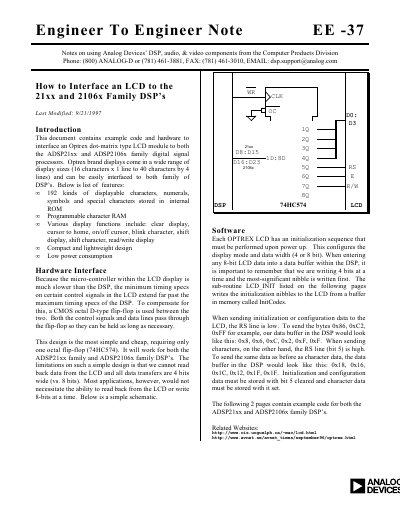
This document describes how to interface an Optrex dot-matrix type LCD module to the ADSP21xx and ADSP2106x family digital signal processors. It details a hardware design using a CMOS octal D-type flip-flop (74HC574) to compensate for timing differences between the DSP and the slower LCD micro-controller. The design supports 4-bit data transfers and covers various display functions such as clear display, cursor control, and shifting.
The document covers Optrex dot-matrix type LCD modules ranging from 16 characters by one line to 40 characters by four lines.
A CMOS octal D-type flip-flop, specifically model 74HC574, must be used to interface the two devices.