
The AD5443, AD5446 and AD5453 are CMOS 12-, 14-, and 14-bit, current output, digital-to-analog converters (DACs). These devices are well suited for portable battery- powered and applications such as waveform generation and analog processing.
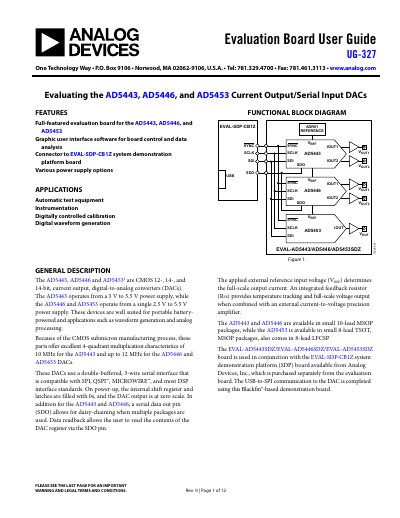
This document is the User Guide (UG-327) for the EVAL-AD5443/AD5446/AD5453SDZ evaluation board. It supports the AD5443, AD5446, and AD5453 current output/serial input DACs and includes instructions for using the accompanying graphic user interface software for board control and data analysis.
The guide details the installation and operation of the LabVIEW software and drivers required to communicate with the board via the EVAL-SDP-CB1Z system demonstration platform. It provides specific examples for configuring the AD5443, AD5446, and AD5453 parts, including data writing, readback verification, and daisy-chain mode settings. Additionally, the document contains schematics and artwork for the evaluation board.
| DAC Resolution | 12-bit, 14-bit |
|---|---|
| Power Supply (AD5443) | 3 V to 5.5 V |
| Power Supply (AD5446/AD5453) | 2.5 V to 5.5 V |
| Interface | 3-wire serial |
| Compatible Standards | SPI, QSPI, MICROWIRE |
| Package (AD5443/AD5446) | 10-lead MSOP |
| Package (AD5453) | 8-lead TSOT, MSOP, LFCSP |
The evaluation kit includes the software and drivers on CD, specifically the LabVIEW software and the SDPDriversNET driver.
Connect the evaluation board to the SDP board and then plug the SDP board into the PC using the USB cable included in the box.
Yes, a serial data out pin (SDO) allows for daisy-chaining when multiple packages are used.
Applications include automatic test equipment, instrumentation, digitally controlled calibration, and digital waveform generation.