
TinyCalc is a Microsoft Excel-based calculator created to simplify the design of TinyBuck-based regulators. TinyBuck products are integrated synchronous buck regulators with one high-side and one low-side MOSFET and a controller/driver integrated in one 5x6mm molded leadless package (MLP). The last digit in the part number signifies the current rating of the product. This calculator covers designs with FAN2103, FAN2106, FAN2108, FAN2110, FAN21SV04, and FAN21SV06 regulators. Regulators with SV in the part numbers have a built-in 5V regulator. This document describes how to configure Excel 07 so this calculator can work without errors. This guide explains how to use the TinyCalc calculator to choose external components for designs once the input and output conditions are provided.
TinyCalc™ is a Microsoft Excel-based calculator designed to simplify the design of TinyBuck™-based regulators. These regulators are integrated synchronous buck devices containing high-side and low-side MOSFETs and a controller/driver in a 5x6mm molded leadless package (MLP). The tool supports specific part numbers, including those with built-in 5V regulator functionality.
| Supported Regulators | FAN2103, FAN2106, FAN2108, FAN2110, FAN21SV04, and FAN21SV06 |
|---|---|
| Package Type | 5x6mm molded leadless package (MLP) |
| Platform Requirement | Microsoft Excel |
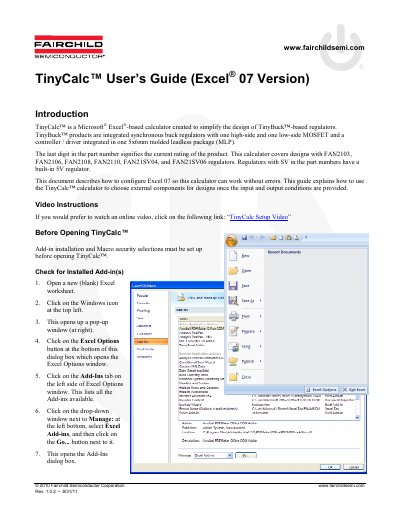
You must install and enable the Analysis Toolpak and Analysis Toolpak – VBA add-ins.
Macro security must be set to Medium, specifically enabling all macros or disabling with notification.
Regulators with 'SV' in the part number, such as FAN21SV04 and FAN21SV06, have a built-in 5V regulator.