
The MAX1038 evaluation kit is designed to evaluate the MAX1038. The MAX1038 is an 8-bit, 12-channel (six-differential-channel) ADC with a 2-wire serial interface. The MAX1038 EV kit board supports three standard 2-wire serial interface speeds: standard mode (S-Mode), fast mode (F-Mode), and high-speed mode (HS-Mode); however, the software provided with this EV kit only supports standard mode. The provided Windows 95/98® software uses the parallel (printer) port of an IBM-compatible PC to emulate a processor with a 2-wire serial interface (S-Mode). The Windows software also provides a friendly graphical user interface (GUI) to exercise the features of the MAX1038 with control buttons and pulldown menus.
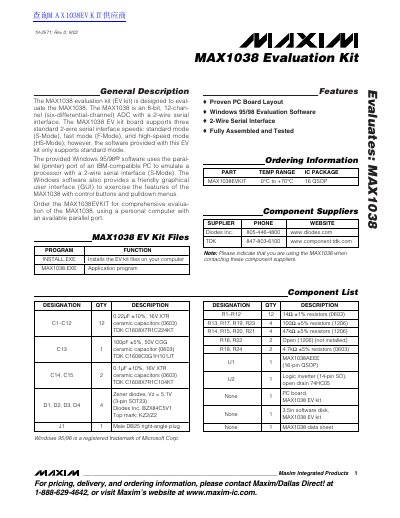
The document describes the MAX1038 Evaluation Kit (EV kit), which is designed to evaluate the MAX1038, an 8-bit, 12-channel ADC with a 2-wire serial interface. The kit includes a fully assembled and tested PC board layout and Windows 95/98 evaluation software that uses the parallel port of an IBM-compatible PC to emulate a processor with a 2-wire serial interface.
| ADC Resolution | 8-bit |
|---|---|
| Number of Channels | 12-channel (six-differential-channel) |
| Interface Type | 2-wire serial interface |
| Operating Temperature Range | 0°C to +70°C |
| IC Package | 16 QSOP |
| Power Supply Voltage | 5V DC |
You need the MAX1038EVKIT, a 5V DC power supply, an IBM-compatible PC with Windows 95/98, an available parallel port, and a standard 25-pin cable.
No, the software only supports standard mode (S-Mode), although the board supports fast mode and high-speed mode.
Connect a 25-pin straight-through, male-to-female cable from the computer's parallel port to the MAX1038 EV kit board.