
Aprilaire 1750A/1770A Whole-House Dehumidifier Owner's Manual

This file describes how to use the Aprilaire® Dehumidifier. The dehumidifier removes humidity from your home, maintaining the humidity at a comfortable level and reducing the unwanted effects of high humidity.
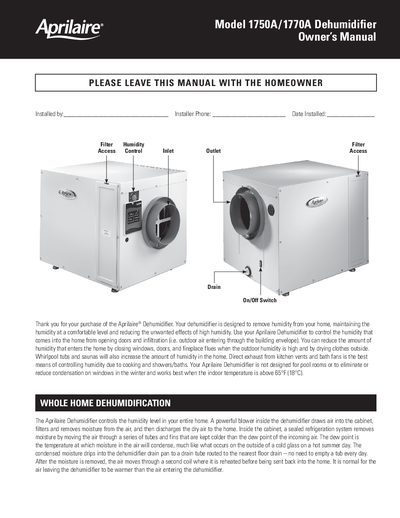

Aprilaire 1750A/1770A Whole-House Dehumidifier Owner's Manual - cover page
Brand
Aprilaire
Document type
User Manual
Language
English
Pages
4
File format
PDF
File size
708 KB
Published
09 July, 2012
Updated
30 September, 2023
MD5 checksum
D626289B3CD95D8FB89E622E9C334BA8

About this manual

This document is the owner's manual for the Aprilaire Models 1750A and 1770A whole-house dehumidifiers. The unit is designed to remove humidity from a home by drawing air into a cabinet where a sealed refrigeration system condenses moisture, which then drains away without needing daily emptying.

What's inside

  • Whole Home Dehumidification
  • Setting the Desired Humidity Level
  • When Does the Dehumidifier Turn On?
  • Optional — Two Zone Dehumidification
  • How Does the Dehumidifier Work?
  • Optional — Heating and Cooling System Blower Operation
  • How Does the Optional Ventilation Work?

Frequently asked questions

How often does the dehumidifier check the humidity level by default?

Once per hour is usually sufficient to maintain comfort.

What is the minimum indoor temperature required for the dehumidifier to work best?

The unit works best when the indoor temperature is above 65°F (18°C).

How frequently can the dehumidifier be set to check the humidity level?

The Cycle Period can be set for once every 30 minutes, once per hour, once every two hours, or once every three hours.

What happens to the air leaving the dehumidifier after moisture is removed?

The air moves through a second coil where it is reheated before being sent back into the home.

Download PDF (708 KB)

More Aprilaire Manuals


View all Aprilaire manuals →