
This document is a quick guide for the Sekonic L-608, providing instructions on how to set custom settings and explanations of each setting option.
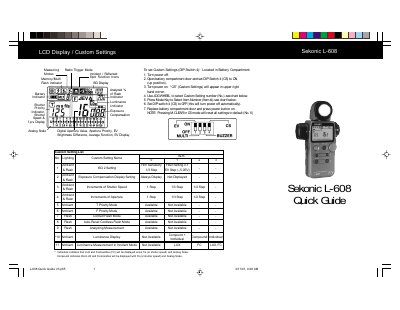
This document serves as a quick guide for the Sekonic L-608 light meter. It details how to access and configure Custom Settings using DIP Switch 4 located in the battery compartment, allowing users to adjust parameters such as ambient exposure increments and flash modes.
The guide also explains various measurement techniques including Spot, Incident, Ambient, Cord Flash, Cordless Flash, and Radio Triggering Mode (with optional RT-32 Module). It covers advanced features like Memory Function for storing up to ten readings, Motion Picture (CINE) mode, Averaging Function, Brightness Difference measurement, and Calibration procedures.
Turn the SPOT/INCIDENT SELECTOR SWITCH to the Incident position and turn the Lumisphere retracting ring counter-clockwise to the full UP right position.
Up to nine readings can be stored and displayed on the analog memory scale, and a tenth measurement can also be displayed.
You can adjust exposure compensation between +/- 9.9 EV.