
This document describes the custom settings and functions of the Sekonic L-558 / CINE light meter. By pressing different buttons and using the jog wheel, users can select metering modes, ISO settings, exposure compensation, etc. Additionally, the document provides the differences between the L-558 and CINE versions.
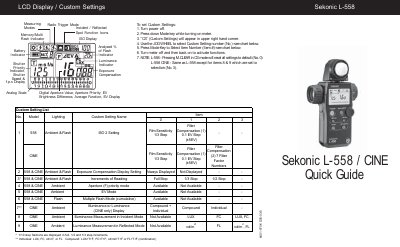
This document provides detailed instructions for the Sekonic L-558 light meter, including how to set custom settings via the CS mode and operate the radio trigger function with the optional RT-32 module. It outlines various measuring modes such as Spot, Incident, Ambient, and Flash, along with advanced features like memory storage and brightness difference analysis.
| Custom Setting Reset | Pressing M.CLEAR in CS mode will reset all settings to default |
|---|---|
| Memory Capacity | Up to nine readings can be stored |
| Calibration Range | Compensate between +/- 1.0 EV |
| Exposure Compensation Range | Between +/- 9.9 EV |
Press the M.CLEAR button while in the CS mode.
Insert the optional RT-32 Module, turn power on, and hold the MODE key while turning the JOG WHEEL.
Turn the meter off, tap the Power button once while holding ISO 1 and ISO 2 keys, then turn the JOG WHEEL.