
Sekonic L-398M Work Make Room Luxury II Quick Guide

L-398M Studio Deluxe II Quick Guide, introducing how to set ISO, measure, compare readings and take continuous readings
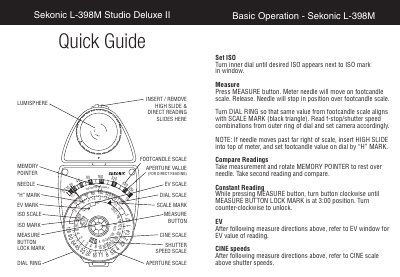

Sekonic L-398M Work Make Room Luxury II Quick Guide - cover page
Brand
Sekonic
Category
Other Electronics
Document type
Quick Start Guide
Language
English
Pages
1
File format
PDF
File size
61 KB
Published
09 July, 2012
Updated
30 September, 2023
MD5 checksum
1EAFEC92B6CFA504DD8EFAB559F13094

About this manual

This document provides basic operating instructions for the Sekonic L-398M Studio Deluxe II light meter. It details how to set the ISO scale and perform direct readings using the footcandle scale and dial ring.

What's inside

  • Basic Operation
  • Insert / Remove Slides
  • Set ISO
  • Measure
  • Compare Readings
  • Constant Reading
  • EV
  • Cine speeds

Frequently asked questions

How do I set the ISO on the Sekonic L-398M?

Turn the inner dial until the desired ISO appears next to the ISO mark in the window.

What should I do if the needle moves past the far right of the scale?

Insert the HIGH SLIDE into the top of the meter and set the footcandle value on the dial by the H MARK.

How do I lock the MEASURE button for a constant reading?

While pressing the MEASURE button, turn it clockwise until the MEASURE BUTTON LOCK MARK is at the 3:00 position.

Download PDF (61 KB)

More Sekonic Manuals


View all Sekonic manuals →