
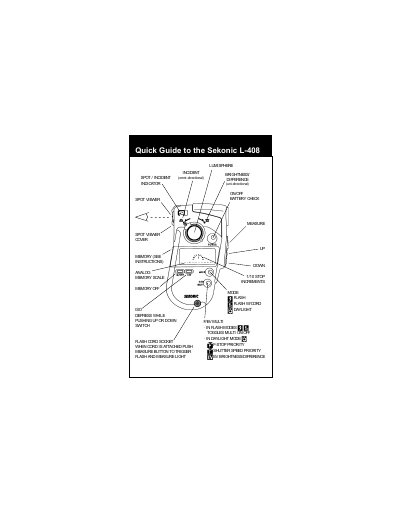
The Sekonic L-408 is a light meter with a spot viewer for spot metering and a lumisphere for incident metering. The guide explains power and battery check, ISO setting, daylight and flash readings, flash cord use, EV reading, and exposure compensation.
Controls include the Measure button, Up and Down buttons, ISO button, F/EV Multi button, and a flash cord socket. The Multi function toggles multi-flash on or off in flash modes and switches between shutter and aperture priority in daylight mode.
| Power indication increments | 1/10th steps |
|---|---|
| Exposure compensation increments | 1/10th step increments |
Slide open the Spot Viewer Cover and sight through the window.
Close the Spot Viewer Cover and rotate the Lumisphere to the high position.
Select Flash with Cord Mode, insert the flash cord, and depress the Measure button.
Press the ISO and F/EV Multi buttons simultaneously and toggle the Up/Down switch.