
Yamaha H11 Quick Operation Guide

This document provides a user manual for the H11 electronic piano
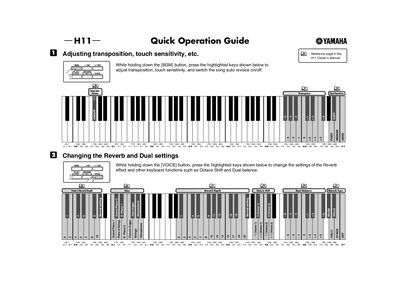

Yamaha H11 Quick Operation Guide - cover page
Brand
Yamaha
Category
Other Electronics
Document type
User Manual
Language
English
Pages
2
File format
PDF
File size
95 KB
Published
12 June, 2012
Updated
30 September, 2023
Model
H11
MD5 checksum
91977EC40D9AF826437C14B9F8CA8607

About this manual

This document serves as a quick operation guide for the Yamaha H11 digital musical instrument. It provides instructions on how to adjust key settings such as transposition and touch sensitivity by holding the [BGM] button and pressing specific keys. It also details how to modify reverb effects, octave shifts, and dual balance settings using the [VOICE] button.

What's inside

  • Adjusting transposition and touch sensitivity
  • Changing Reverb and Dual settings
  • Checking version number and Moving Key feature
  • List of functions that use multiple buttons
  • Voice Settings Saving
  • Format Formatting USB storage media
  • Data Backup
  • Internet Direct Connection (IDC)
  • Tuneup and Tuning
  • Voice Select

Frequently asked questions

How do I adjust transposition and touch sensitivity?

While holding down the [BGM] button, press the highlighted keys shown in the guide.

How do I change the Reverb effect settings?

Hold down the [VOICE] button and press the highlighted keys to change settings like Reverb Depth and Type.

How do I check the version number?

While holding down the [MOVING KEY] button, press the highlighted keys to check the version number.

Download PDF (95 KB)

More Yamaha Manuals


View all Yamaha manuals →