
This document introduces the use of N1850 telephone, including dialing, answering, hanging up, and saving phone numbers.
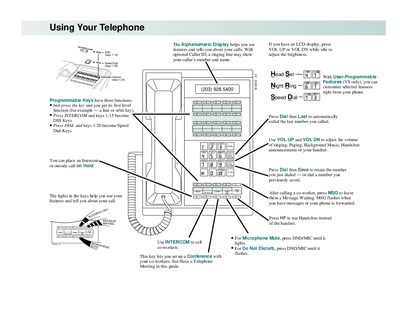
The manual describes the telephone’s alphanumeric display, volume controls, hands‑free operation, and programmable keys. It shows how to adjust brightness, set night‑ring, and use features such as DND, MIC mute, and intercom.
Detailed procedures cover placing outside calls, calling co‑workers, handling message waiting, setting up conferences, putting calls on hold, transferring calls, and programming speed‑dial and other user‑programmable features.
| Display type | Alphanumeric |
|---|---|
| Volume control | VOL UP / VOL DN buttons |
| Hands‑free function | HF key |
| Programmable keys | DSS, Speed Dial, Feature keys |
Lift the handset (optional), press a line key, and dial the outside number.
Press the HOLD key; the call is placed on system hold and can be retrieved later.
Press DIAL then PGM#, dial the speed‑dial bin number, optionally enter a name, then store the desired phone number.