
This document is the user manual of a certain brand and model satellite receiver
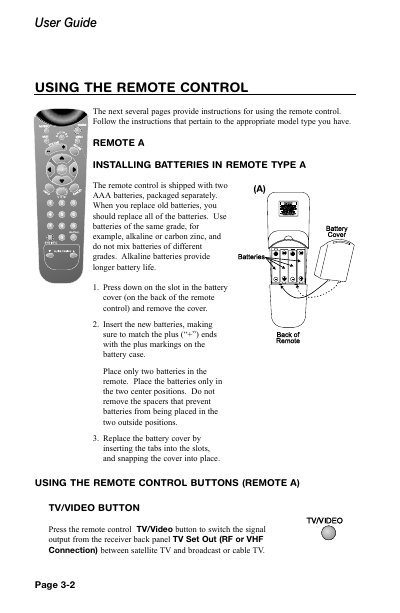
This guide explains how to install AAA batteries in both Remote A and Remote B, and describes the function of each button on the remote, including power, volume, mute, menu, guide, and arrow keys. It also covers the differences between IR and UHF remote types and their operating ranges.
Additional sections cover programming the remote to control other devices, changing device codes, and troubleshooting steps such as adjusting the remote address or using an attenuator for UHF interference.
| Battery type | AAA |
|---|---|
| UHF remote range | up to 30 metres |
| IR remote range | up to 40 feet |
Press and hold the Mode button for about 3 seconds, then follow the on‑screen instructions to change the address as described on page 3‑13.