
This document is the user manual for Alcatel 4035 telephone. It introduces the features and characteristics of the telephone, including how to make a phone call, handle multiple calls, transfer calls, call waiting, call forwarding, phone password, ringtone settings, speaker volume, dialing timer reminder, display brightness and other functions.
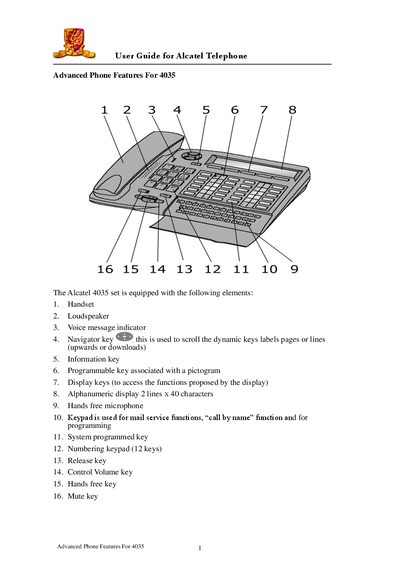
The Alcatel 4035 telephone is equipped with a handset, loudspeaker, hands‑free microphone, alphanumeric display (2 lines x 40 characters) and several programmable keys. It supports internal and external calls, call transfer, call pick‑up, call waiting, call forwarding, voicemail and various phone settings.
This guide provides step‑by‑step instructions for making calls, using call‑by‑name, handling multiple calls, configuring voicemail, adjusting ringing melody, volume, display brightness, and setting a personal password. It also covers advanced functions such as three‑way conference, call park and group call pick‑up.
| Display | Alphanumeric 2 lines x 40 characters |
|---|---|
| Hands‑free microphone | Included |
| Loudspeaker | Included |
Lift the handset, dial the extension number, and hang up to terminate the call.
Dial *4, then dial the extension number you want to forward calls to. To cancel, dial *8.
Press the Prog key, then the Melody key, and use Next/Prev to select the tone. Press = to confirm.