
Instructions on how to use Seiko Alarm Chrono Cal. 7T32 watch, including how to reset the watch, zero the hands, set the date, etc.
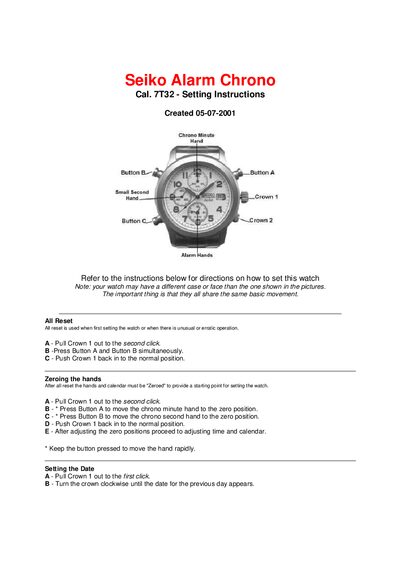
The Seiko 7T32 Alarm Chrono Setting Instructions guide users through all essential operations for this watch, including initial reset, zeroing the hands, and configuring calendar, time, alarm and dual‑time displays. Clear diagrams and numbered steps help ensure accurate adjustments.
Key sections cover All Reset, Zeroing the Hands, Setting the Date, Setting the Time, Alarm Hand Adjustment, Alarm Time Setting, Alarm Engagement/Disengagement, Chronograph use, and Dual‑Time Display configuration. Safety notes warn against setting the date between 9 p.m. and 3 a.m. and remind users that the watch is not a perpetual calendar.
Pull Crown 1 out to the second click, press Button A and Button B simultaneously, then push Crown 1 back to the normal position.
Do not set the date between 9:00 p.m. and 3:00 a.m., as the date may not change properly.
Pull Crown 2 out to the first click, press Button C to set the alarm hands to the desired time, then push Crown 2 back in.
Pull Crown 2 out to the second click and turn to set the small alarm hands to the desired secondary time zone, then push Crown 2 back in.