
The FH-835G is used for scanning medium-format (120/220) or 59 mm × 82 mm film for electron microscopes. The number of frames that can be scanned depends on the type of film; up to four frames for 6 × 4.5 film, up to three frames for 6 × 6 film, and up to two frames for 6 × 7–6 × 9 film. When using the FH-869G Glass-Covered Holder for Brownie Film, caution should be taken to prevent Newton's rings (a radial interference pattern) from appearing when scanning bent or distorted film. Seals should be attached to the matte emulsion surface of the film between each pair of frames, except for the first and second frames, and the film should be placed on top of the masking sheet with the matte emulsion surface facing down. Seals can be reused. It is important to use only one type of film at a time and avoid placing negative and positive film in the holder together. Proper alignment of the film with the film line on the holder is necessary to ensure accurate color reproduction. Multiple single-frame strips of film can be inserted in the holder at the same time, but positive and negative film should not be mixed. The lower portion of the holder's glass is treated to prevent interference, so care should be taken to avoid fingerprints or stains. A blower should be used to remove dust and lint from the film and holder to prevent damage.
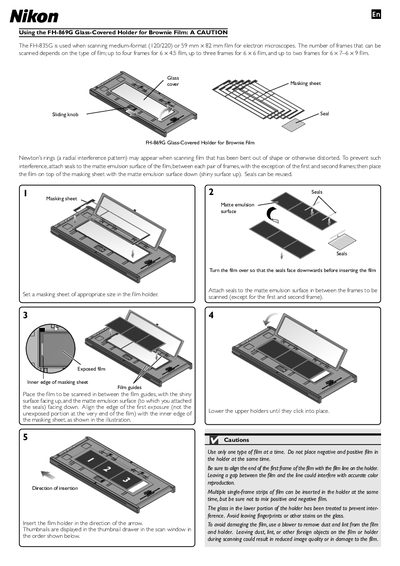
This manual describes the proper use of the FH-869G glass‑covered holder for Brownie film. It covers preparation of the masking sheet, placement of seals on the matte emulsion surface, and alignment of the film frames before scanning.\n\nCautionary notes include using only one film type at a time, avoiding fingerprints on the glass, and inserting the holder in the direction of the arrow. Follow the steps to prevent interference patterns and ensure accurate color reproduction during scanning.
| Compatible film formats | medium-format (120/220) or 59 mm × 82 mm |
|---|---|
| Maximum frames per scan | 4 (6×4.5), 3 (6×6), 2 (6×7‑6×9) |
Insert the film holder in the direction of the arrow shown on the holder.