
The document provides information about the G-16 APEM A02 series illuminated or non-illuminated pushbutton switches, including their panel cut-out dimensions and assembly requirements.
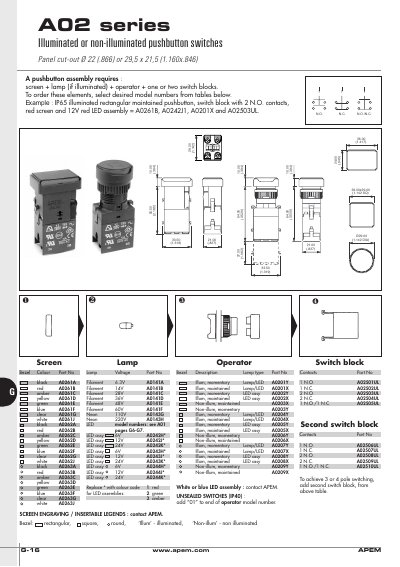
The A02 series from APEM covers a wide range of panel‑mounted devices, including illuminated or non‑illuminated pushbutton switches, indicators, rotary switches, keylock switches, emergency‑stop switches, and mushroom‑head pushbuttons. Each device can be configured with different bezel colours, lamp voltages, LED colours, and optional second switch blocks for multi‑pole operation.
Ordering is done by selecting the desired screen, lamp, operator and switch‑block part numbers from the tables. Installation notes describe panel cut‑outs, mounting hardware, and wiring procedures, while the specifications section lists mechanical life, environmental protection, and electrical ratings for the emergency‑stop devices.
| Mechanical life | 6.050 cycles |
|---|---|
| Operating force | 20 N |
| Operating temperature | -20°C to +85°C |
| Environmental protection (front) | IP65 |
| Environmental protection (back) | IP40 |
| Current/voltage rating | 2.5 A / 380 VAC |
| Contact gap | > 3 mm |
| Dielectric strength | 2 500 V |
| Electrical life | 6.050 cycles |
The emergency stop switch is rated for 6 050 mechanical cycles.
It has an IP65 rating on the front of the panel and IP40 on the back.
Add a second switch block to the assembly to achieve 3‑pole or 4‑pole switching.