
This document describes the features and characteristics of Polaroid camera product series, including Non-AF Model Cameras and AF Model Cameras, as well as the functions and usage of the cameras.
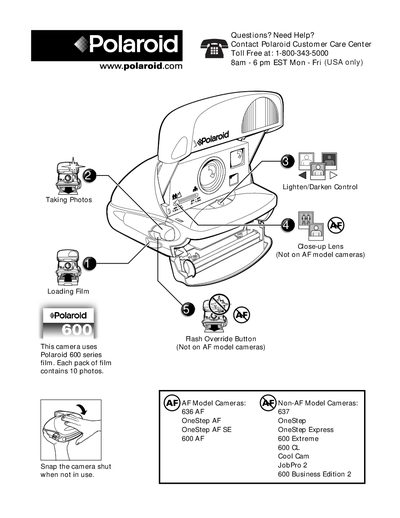
The guide provides step‑by‑step instructions for loading film, positioning subjects, and operating the camera. It covers the Lighten/Darken control for adjusting exposure, the Close‑up Lens lever, and the Flash Override button for shooting without flash.
Additional sections describe how to develop photos safely, clean the developer rollers, and perform basic camera maintenance such as lens cleaning. Contact information for Polaroid Customer Care is also included.
| Photos per film pack | 10 photos |
|---|---|
| Recommended subject distance | 4‑8 ft (1.2‑2.4 m) |
| Minimum developing temperature | 55 °F (13 °C) |
Open the film door, hold the film pack by the edges, push it in until you hear a click, then close the film door.
Press the flash override button to take a photo without flash, which is useful for metallic, shiny surfaces or subjects behind glass.
Dampen a clean cloth with tap water, open the film door, and gently clean the rollers in a dimly‑lit area.