
HGST hard drive's Bulk Data Encryption technology user guide
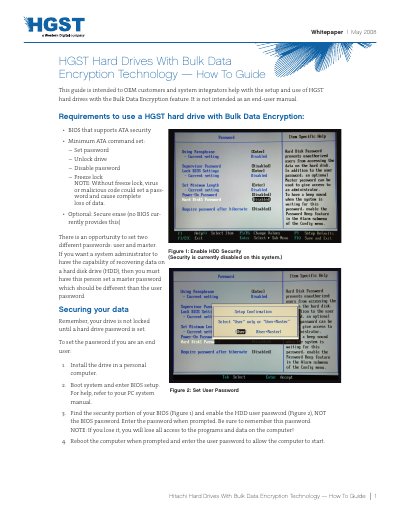
This How‑To Guide explains how to configure HGST hard drives that support the Bulk Data Encryption feature. It is intended for OEM customers and system integrators and describes the BIOS requirements, password configuration steps for both end users and system administrators, and the available security modes.
The document also details the two secure‑erase methods (normal and enhanced), how to disable security, and provides contact information for technical support. It includes warnings about data loss if passwords are forgotten and notes on legal compliance for encryption‑enabled devices.
| Encryption algorithm | AES |
|---|---|
| BIOS requirement | ATA security support |
| Minimum ATA command set | Set password, Unlock drive, Disable password, Freeze lock |